
NextGen is Breadcrumb's new web portal. It's been rebuilt from the ground up around a site-based navigation, so site teams can see who's on site, what's been submitted and what needs their attention, in one site-based view.
From 19 October, you can easily move between NextGen and Classic using a toggle located within both portals. Allowing you to switch between portals whenever you need it.
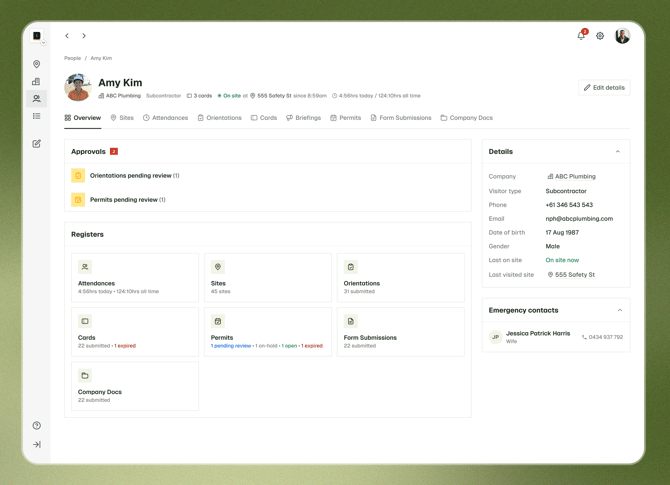
This article covers what you can and can't do in NextGen today, and we'll be sure to keep it updated as new features are released.
Who is NextGen for?
Right now, it's built for day-to-day site management teams. Some tasks, mostly company-wide setup and configuration, still happen in the Classic web portal.
In its current form, NextGen is designed for the people who run sites day to day:
- Site Managers and site hosts who manage inductions, permits and company documents for their sites
- Foremen and supervisors who need to check who's on site and whether they're compliant
- Safety and HSEQ teams who review records across one or more sites
Company admins can use NextGen too, but will still need Classic for setup work like permissions, forms, integrations and settings. See Admin tasks that stay in Classic below.
Nothing changes in the Breadcrumb mobile app. Workers check in, complete inductions and fill out forms the same way they always have.
What can you do in NextGen?
The tables below show what's available in NextGen today, broken down by role. A tick means you can do it in NextGen. For anything else, switch to Classic. Your data is the same in both portals, so nothing is lost when you switch.
Site management
For Site Managers, site hosts, foremen, supervisors and safety teams.
| Task | Available in NextGen |
|---|---|
| Sites | |
| Use site-based navigation, showing only the sites you have access to | ✓ |
| View the site overview page, all site-level registers, pending approvals, and basic site-level settings. | ✓ |
| Access and download the site QR code | ✓ |
| Registers | |
| View and filter the Companies, People, Attendance, Inductions, Cards, Permits, Form Submissions, Company Docs and Evacuations registers | ✓ |
| Download individual records as PDFs | ✓ |
| Download register data as a CSV | ✗ Use Classic |
| Inductions | |
| Approve, reject or request a revision on a worker induction | ✓ |
| Edit a workers induction (coming soon) | ✗ Use Classic |
| Review a workers induction using AI | ✗ Use Classic |
| Permits | |
| Approve or reject permits | ✓ |
| Manage permit lifecycle stages (open, on-hold, closed) | ✗ Use Classic |
| Documents | |
| Review company documents that use a review checklist, such as SWMS | ✓ |
| Review company documents without a review checklist, such as an SDS | ✗ Use Classic |
| Companies and onboarding | |
| See which companies are on site, and have completed onboarding | ✓ |
| Send onboarding emails and track uploaded documents | ✓ |
| Add a company from your company directory to a site | ✓ |
| Remove a company from a site | ✓ |
| Complete a full onboarding for a company | ✗ Use Classic |
| View a full company record across all sites | ✗ Use Classic |
| People | |
| Find workers and visitors in the People directory | ✓ |
| Check workers in or out as a host | ✗ Use Classic |
| Evacuations | |
| See which sites have an active evacuation | ✓ |
| Review evacuation records, with anyone unaccounted for highlighted | ✓ |
| Export an evacuation record as a PDF, or the muster list as a CSV | ✓ |
| Start an evacuation roll call or mark people as present | ✗ Use the mobile app |
| Site briefings | |
| View all site briefings and site approval rates | ✓ NextGen only |
| Create, save as draft, schedule and submit site briefings | ✓ NextGen only |
| Communication | |
| Send site alerts | ✗ Use Classic |
| Create or manage announcements | ✗ Use Classic |
| Report on announcements | ✗ Use Classic |
| Manage your notifications | ✗ Use Classic |
| Plant and equipment | |
| Register or manage plant and equipment | ✗ Use Classic |
| Review plant inductions | ✗ Use Classic |
| Set up asset report forms or add employees to the asset tracker | ✗ Use Classic |
| Reports | |
| Set up automated email reports | ✗ Use Classic |
| Integrations (Procore & Autodesk Forma) | |
| Sync sites and companies | ✓ |
| Sync attendance hours to the site diary | ✓ |
| Sync inductions, briefings, permits, forms, documents and evacs | ✓ |
| Open the matching Procore item from a record | ✓ NextGen only |
Full administrator
Administrators can do everything in the site management table, plus the tasks below.
| Task | Available in NextGen |
|---|---|
| Sites | |
| View registers across all your sites | ✓ |
| Archive and restore sites, including in bulk | ✓ |
| Add a new site | ✗ Use Classic |
| Manage site templates | ✗ Use Classic |
| Manage site location services | ✗ Use Classic |
| Companies | |
| See onboarding status for companies across all sites | ✓ |
| Archive and restore companies | ✓ |
| Add a new company | ✗ Use Classic |
| Edit a company's contact details | ✗ Use Classic |
| Forms and inductions | |
| Create or edit forms and inductions at company level | ✗ Use Classic |
| Manage forms and inductions at site level | ✗ Use Classic |
| Manage document configuration settings | ✗ Use Classic |
| Visitors and attendance | |
| Create or edit visitor types at company level | ✗ Use Classic |
| Manage visitor types at site level | ✗ Use Classic |
| View a worker's status from Attendance | ✗ Use Classic |
| Evacuations | |
| Review evacuation records across all sites | ✓ |
| Permissions and integrations | |
| Manage site and company permissions | ✗ Use Classic |
| Manage integrations, such as Procore and Autodesk | ✗ Use Classic |
| Set up automations | ✗ Use Classic |
| Company settings and profile | |
| Update your company logo | ✗ Use Classic |
| Manage your profile, including password, picture and details | ✗ Use Classic |
| Reports | |
| Download or schedule automated CSV reports | ✗ Use Classic |
What else is on the way?
We're adding new features to NextGen regularly, with the goal of bringing across everything you use in Classic to NextGen. Below is work we have planned for the rest of the year, and although timing may change, we'll be updating this article as each feature is released:
- Worker notes. Add notes to a worker's profile, including warnings (yellow cards) and blocks (red cards), so the right people are alerted when people attend their sites.
- Loud evacuation alerts. Trigger a loud alarm on checked-in workers' phones during an evacuation, even if their phone is on silent.
- Induction revisions. Edit a worker's induction as a host.
- Reporting. The first version of reporting in NextGen, giving you visibility into key data and activity across your sites.
- Integration settings. Manage your Procore and Autodesk integration settings from NextGen.
- Company settings. The first company settings in NextGen, starting the move of admin setup out of Classic.
- Single sign-on (SSO). Log in to Breadcrumb with your company's existing sign-on.
- Form submissions and revisions. Submit and revise forms from the web portal.
- Permit status management. Open, hold and close permits in NextGen.
- Plant and equipment. A rebuilt plant and equipment experience, including registering, managing and reviewing plant.
- Full company settings. All company setup and configuration in NextGen, so admins no longer need Classic.
Frequently asked questions
- Do I have to choose between NextGen and Classic?
No. Both portals use the same data. Anything you do in one shows up in the other. - Do workers need to do anything differently?
No, NextGen is a change to the web portal only. The mobile app works exactly as it does today, although it will also be getting some love in future. - Who do I contact with questions or feedback?
Reach out to your Customer Success Manager or our Support team. We'd love to hear how NextGen is working for your site teams.