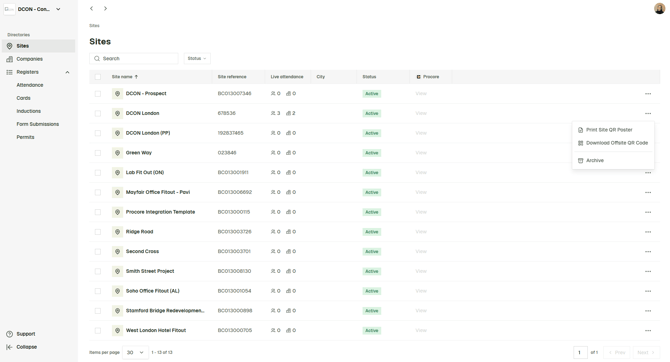
From your Breadcrumb Nextgen portal, navigate to Sites Overview, find the relevant site, click the three dots to the right and from there select:
Print Site QR Poster - this should be displayed on your site, at the entrance, canteen or office area. It allows workers to check into the project, submit an induction/orientation and sign off on any relevant documents.
Download Offsite QR Code - this should be shared with your main contact at the subcontractor company for distribution to workers coming to site. It allows workers to submit an induction/orientation before they arrive to site. It does not allow them to check into the project or sign off on documents such as RAMS or JHAs as these should only be covered when they physically arrive to site and scan the Site QR Poster (above).