
When workers check in and out using Breadcrumb, their labor data can automatically sync to the Autodesk Construction Cloud Forms tool within the Work Log.
This allows project teams to track subcontractor labor activity and hours directly inside Autodesk without manual entry.
Data That Syncs from Breadcrumb
Breadcrumb will send the following information to the Autodesk Work Log form:
- Subcontractor Name
- Total Workers
- Total Hours
- Average Hours Per Person
- Work Performed Notes (optional)
These values are populated in the corresponding Work Log fields in Autodesk.
Real-Time Worker Sync
Breadcrumb will sync certain information in real time while workers are still active on site.
During active work periods, the following information will sync:
- Subcontractor name
- Total number of workers currently on site
This allows Autodesk users to immediately see which subcontractors currently have workers active on the project.
Active Worker Tracking
While workers remain checked in:
- Total hours will not be finalized
- The system considers the labor entry still active
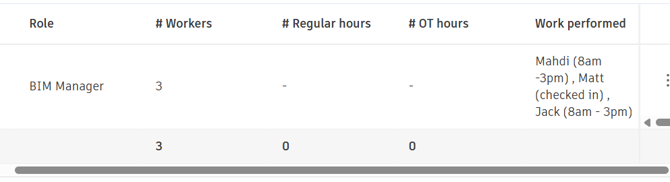
During this time, Breadcrumb will populate the Work Performed Notes field with worker status information, indicating:
- Workers currently on site
- Workers checked in
- Workers checked out
Example:
Mahdi (8am – 3pm), Matt (checked in), Jack (8am – 3pm)
(Example shown below)
Final Hour Calculation
Once all workers for a subcontractor have checked out, Breadcrumb will update the Autodesk Work Log with:
- Total Hours
- Average Hours Per Person
This ensures hours are only finalized after work activity is complete.
Example Work Log Output
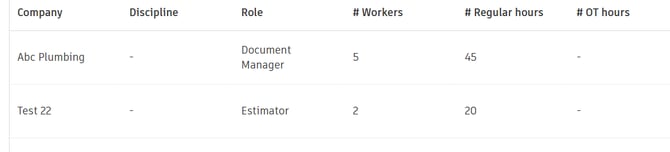
The Autodesk Work Log will display entries similar to:
| Company | Role | # Workers | Regular Hours |
|---|---|---|---|
| Abc Plumbing | Document Manager | 5 | 45 |
| Test 22 | Estimator | 2 | 20 |
(Example shown below)
Important Requirement: Form Status
For the integration to update worker hours:
The Autodesk Work Log form must remain in "In Progress" status.
If the form is closed, Breadcrumb will no longer be able to sync or update worker hours, and updates will fail.
Sync Summary
| Data Type | Sync Behavior |
|---|---|
| Subcontractor Name | Real-time |
| Worker Count | Real-time |
| Work Performed Notes | Real-time updates |
| Total Hours | After all workers check out |
| Average Hours Per Person | After all workers check out |
Key Notes
- Real-time worker counts help track active subcontractors on site.
- Final hours only sync once all workers have checked out.
- The Work Log form must remain open for updates to occur.